

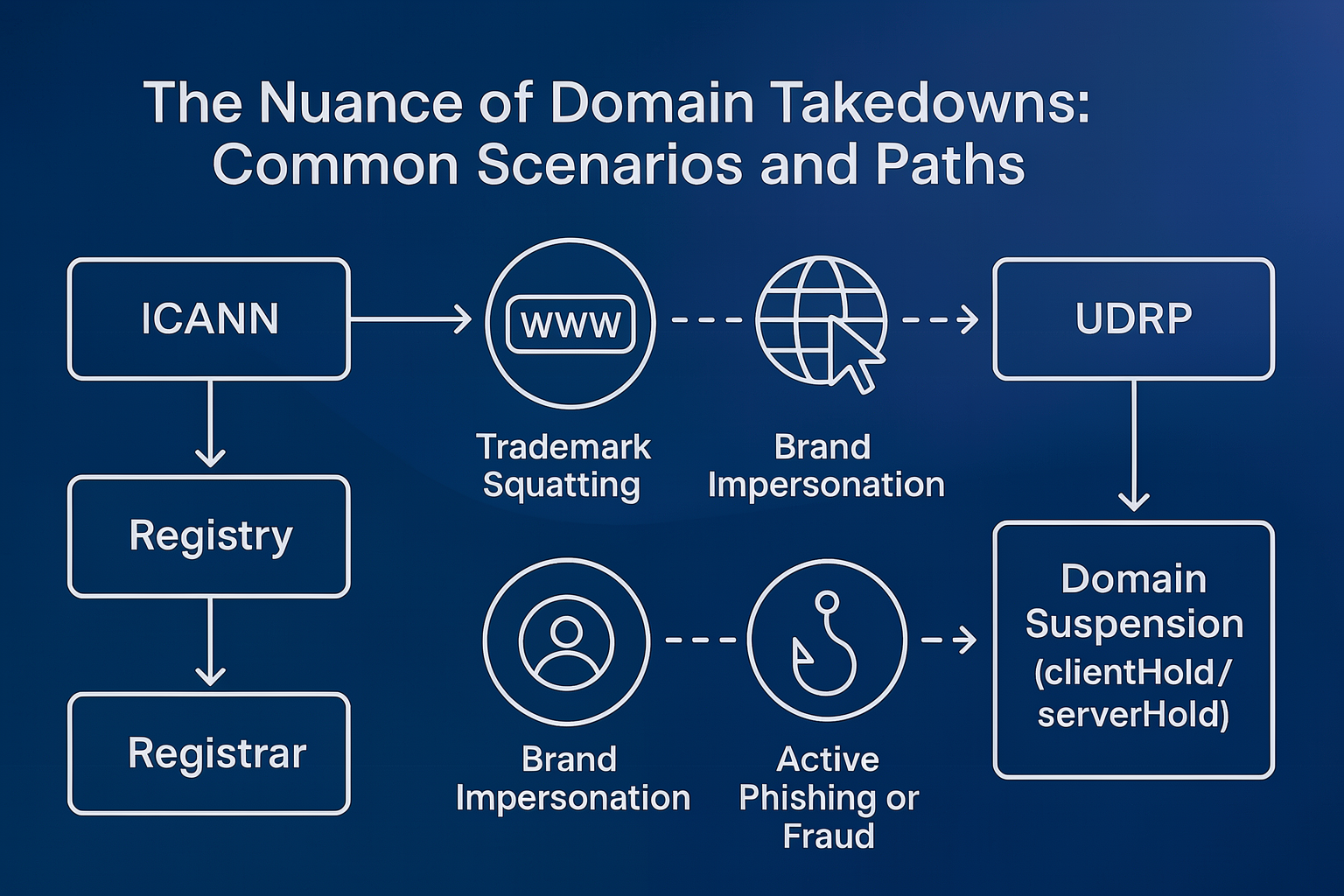
A domain takedown is the formal process of getting a fraudulent or malicious domain suspended, de-indexed or removed from the internet. Whether it works depends on what the domain is doing. Registrars and registries act quickly on provable abuse such as phishing, but they treat trademark-only cases as disputes for the Uniform Domain-Name Dispute-Resolution Policy (UDRP) or the courts.
This guide is part of The Nuance of Takedowns, PhishFort’s series on why takedowns succeed, stall or fail. For the full process, from confirming a threat to monitoring after removal, start with Phishing Takedown Process Explained.
Which domain takedown route fits each scenario?
The right route is set by the harm the domain causes, not by how closely the name resembles your brand.
| What the domain is doing | How registrars and registries see it | Route that works | What to expect |
|---|---|---|---|
| Registered with your trademark, no website or email | A possible trademark dispute | Monitor it, buy it, or file a UDRP complaint | No suspension without evidence of abuse |
| Shows a parked page full of ads | A legitimate business model | Monitor it and act when the content changes | The request is rejected |
| Hosts a copy of your site but collects no data | A content issue | UDRP, a search for hidden data collection, a customer warning | Suspension is unlikely until it collects data |
| Steals logins, payment data or personal data, with or without your brand in the name | DNS abuse | Abuse report to the registrar, then the registry | Suspension of the domain |
| Uses your copyrighted text, images or software, while the domain name itself is not the problem | A content issue for the host | DMCA notice to the hosting provider | The content is removed, the domain stays |
| Is a legitimate site that was hacked to host phishing | The domain owner is also a victim | Report to the hosting provider and the site owner | The files are removed, the site stays online (compromised site takedowns) |
Who decides on a domain takedown?
Three parties sit behind most domains, and each one has a different say in a takedown:
- ICANN, the Internet Corporation for Assigned Names and Numbers, is the nonprofit that sets baseline policy for most generic top-level domains (gTLDs) such as .com and .org.
- The registry runs a top-level domain. Verisign runs .com; CIRA, a national authority, runs Canada’s .ca.
- The registrar is the company where the domain was bought, such as GoDaddy, Namecheap or Squarespace.
For most gTLDs, registries and registrars work under ICANN contracts. Those contracts require them to act on DNS abuse and to handle trademark disputes through UDRP. Even so, outcomes vary, because ICANN, registries and registrars often read the same obligation differently.
What are registrars and registries obliged to act on?
Registrars and registries are obliged to act on evidenced DNS abuse. Under ICANN’s DNS abuse obligations, that covers five categories:
- Phishing
- Malware
- Spam used to deliver other abuse
- Pharming, which redirects users to fake sites by tampering with DNS
- Botnets, networks of infected devices controlled by an attacker
Outside these categories, the obligation drops quickly. A domain that uses your brand but does none of the above is, for the registrar, a dispute between two parties and not a security threat.
Country-code top-level domains (ccTLDs), such as .de or .jp, are not bound by ICANN contracts. They follow national policy, which may offer little recourse. See ccTLD takedowns for how each type of registry behaves.
Scenario 1: A domain with your trademark and no malicious content
A domain registered with your trademark and no content will not be suspended. Without evidence of active abuse, registrars and registries see a possible trademark dispute and will not judge intent: the registrant could be a cybersquatter waiting for an offer, or someone who has never heard of your brand.
A parked page changes nothing. Imagine you own acmeco.com and someone registers acmecompany.com, which shows a page of ad links. You worry about what comes next and ask for a takedown. The request will almost certainly fail, because registrars do not act on possible future threats, and domain parking is a legitimate business model that registrars themselves use to earn from unused domains.
Your options:
- Buy the domain. It gives certainty for high-risk names, but it is expensive at scale and rewards the squatter, which can invite more squatting.
- Monitor the domain. Watch for changes in DNS records, content or email activity, and report the moment it turns malicious. The risk is that the attacker uses it first and you react second. See typosquat protection for how brands watch for these registrations.
- File a UDRP complaint. UDRP requires proof that the domain was registered and used in bad faith: intent to confuse users, resell the domain or block the trademark holder. If the domain never hosts content or sends email, that proof is hard to build, especially for smaller brands.
Each option is a trade-off between risk, cost and the likelihood of misuse. For brands that are targeted often, monitoring paired with fast reporting is usually the practical path.
Scenario 2: A look-alike site that does not capture data
A look-alike site that copies your site or store but collects no logins, payment details or personal data is still treated as a content issue. You now have stronger signs of bad faith, but most registrars avoid ruling on content, because doing so would make them the internet police.
Your options:
- File a UDRP complaint. Evidence of impersonation and user confusion makes success much more likely than in Scenario 1.
- Look for hidden data collection. Check forms, scripts and redirects. If any of them capture personal data, the case becomes DNS abuse and moves to Scenario 3.
- Warn your customers. Publish a notice, update support scripts and name the look-alike domain in customer communications.
Scenario 3: Active phishing or fraud
A domain that actively steals credentials, personal data or payment details is DNS abuse, and a well-documented report usually leads to a quick suspension. This applies whether or not your trademark is in the name. Scammers often register generic domains such as account-services-login[.]com or secure-payment-portal[.]net, and these are reported the same way, because the harm is in how the domain is used.
The suspension takes one of two forms. A clientHold is applied by the registrar and a serverHold by the registry; both stop the domain from resolving, and only the registry can lift a serverHold. How registrars weigh a suspension (domain age, the name itself, related domains) is covered in Domain Suspension: Key Factors.
Keep monitoring after the suspension. Attackers sometimes remove the content for a while to argue for reinstatement, then relaunch.
When is a DMCA notice better than a domain takedown?
A DMCA notice is better when the problem is copied content and not the domain. If a site uses your copyrighted text, images or software, a notice under the U.S. Digital Millennium Copyright Act (DMCA), sent to the hosting provider, is often the fastest fix. It removes the content but not the domain, and it works in jurisdictions that recognize the DMCA. The steps are in the DMCA takedown guide.
Why do domain takedown requests get rejected?
Domain takedown requests usually fail for one of four reasons, even when the victim feels the case is clear. Knowing which one applies tells you what to change.
The evidence cannot be verified
Most anti-abuse teams work on “innocent until proven guilty”. A screenshot of a phishing page on a domain registered days ago is usually enough. An alleged phish with no screenshot, or a link to a forensic tool that does not clearly show the attack, is usually rejected. The analyst deals in facts, not possibilities: the risk that a domain might be used against your brand is never enough.
This caution has a reason. Registrars weigh the cost of leaving a phish online against the liability of suspending a lawful business, such as a real bank’s new marketing site reported as suspicious. Without clear evidence of abuse, the default answer is no.
The case is about the trademark only
Registrars and registries treat cases where a domain uses your brand without technical abuse as content disputes. They will point you to UDRP or a court order, or tell you to contact the hosting provider. That can be a dead end when the host hides behind a proxy service or sits in an unresponsive jurisdiction, which leaves no one in the domain’s chain obliged to act.
The report was rushed
Every report has to be documented, evidenced and reviewed, by a person or an automated system. A report sent in a hurry and missing key details is often rejected only because the case is not clear. Pressing the registrar with repeated demands also backfires: abuse handling is a cost for these companies, and extra friction makes them apply the policy to the letter instead of helping.
The responsible party does not respond
Sometimes the case is perfect and nothing happens. The registrar’s abuse system may be broken or understaffed, or the provider may be bulletproof, meaning it ignores abuse reports on purpose to protect its revenue. In PhishFort’s takedown work, the escalation order that works best is:
- Registrar first. It gets the chance to investigate and protect its customer relationship. Going straight to the registry can cause pushback.
- Registry next, if the registrar does not respond or wrongly disagrees. The registry may act itself or tell the registrar to act.
- ICANN last. A complaint triggers a formal request to the registrar and registry to justify their response. It is slow and depends on the same parties that are not acting.
When escalation stalls, the goal shifts from removal to mitigation: get the domain onto blocklists so browsers, email providers and security tools warn users, and report the content to the hosting provider, which may sit in a more responsive jurisdiction than the registrar.
What evidence should a domain abuse report include?
A domain abuse report should let a reviewer confirm the abuse in a few minutes, without running any tools. Include:
- the full URL and the date and time you observed the abuse
- screenshots or a screen recording of the page doing harm
- what the page captures (logins, card data, personal data) and where that data is sent
- HTTP headers or responses that show the page is live
- the domain’s registration date, because a recently registered domain is far easier to suspend
- related domains on the same nameservers, IP address or registrant, with a sample that shows abuse
Write the report for a reader who may not be a security specialist. In many registrars, the person on the abuse queue also handles support or compliance. A short, plain explanation of the harm gets more suspensions than a long technical dump.
How PhishFort handles domain takedowns
PhishFort runs domain takedowns as a managed program. Analysts validate each detection, pick the route that fits the scenario, file the request through direct channels with registrars, registries and hosting providers, and follow every case until the content is offline. PhishFort has a 99%+ takedown success rate. For brands that want this handled for them, see our domain takedown service.
Every confirmed phishing domain goes to the PhishFort Blocklist. The PhishFort Blocklist reaches 418M+ users through browsers, DNS providers, antivirus tools and wallets, so users are warned while a request is still open or when a provider will not act. After removal, Brand Monitoring watches 24/7/365 and re-engages the takedown if the domain comes back.
Before you request a domain takedown: a checklist
- Is the domain causing DNS abuse today, or is it only using your brand?
- If it is only using your brand, have you weighed buying it, monitoring it and filing UDRP?
- Could a reviewer confirm the abuse from your evidence alone, in a few minutes?
- Are you sending the report to the registrar first, with the registry and ICANN as later steps?
- If the domain is a ccTLD, do you know what that registry requires?
- Is someone watching for the domain to return, or for the same attack on a new domain?
Need one phishing domain removed now? Request a Single Takedown. No subscription required.
Related guides
The Nuance of Takedowns series:


